 2667f603e5
Replace 80 generic 'return 1' error returns with specific exit codes
across alpine-tools.func, build.func, core.func, cloud-init.func,
and vm-core.func, matching the EXIT_CODES.md schema.

alpine-tools.func (51 replaced):
- check_for_gh_release, fetch_and_deploy_gh: API/DNS/download errors
- setup_yq, setup_adminer, setup_uv, setup_java, setup_go, setup_composer
- need_tool, download_with_progress

build.func (13 replaced):
- install_ssh_keys_into_ct: file operation errors (252)
- choose_and_set_storage_for_file: parameter/service errors (65/150)
- _find_default_vars, default_var_settings: file not found (252)
- destroy_lxc, resolve_storage_preselect, select_storage: param errors (65)
- validate_storage_space: hardware/space errors (236)

core.func (9 replaced):
- get_header: download failed (250)
- prompt_select: no options (65)
- check_or_create_swap: dd/mkswap/swapon failures (150), invalid size (65)
- get_current_ip, get_lxc_ip: IP detection failed (6)

cloud-init.func (6 replaced):
- setup_cloud_init: invalid IP/gateway format (65)
- configure_cloud_init_interactive: whiptail missing (127)
- get_vm_ip, wait_for_cloud_init: timeout/connection errors (7/150)

vm-core.func (1 replaced):
- get_header: download failed (250)

Boolean returns (validate_*, is_*, prompt_*, 'no update') kept as return 1.

Proxmox VE Helper-Scripts
A Community Legacy in Memory of @tteck






Simplify your Proxmox VE setup with community-driven automation scripts
Originally created by tteck, now maintained and expanded by the community

🎯 Key Features
⚡ Quick SetupOne-command installations for popular services and containers |
⚙️ Flexible ConfigSimple mode for beginners, advanced options for power users |
🔄 Auto UpdatesKeep your installations current with built-in update mechanisms |
🛠️ Easy ManagementPost-install scripts for configuration and troubleshooting |
👥 Community DrivenActively maintained with contributions from users worldwide |
📖 Well DocumentedComprehensive guides and community support |
🔒 SecureRegular security updates and best practices |
⚡ PerformanceOptimized configurations for best performance |
📋 Requirements
🖥️ Proxmox VEVersion: 8.4.x | 9.0.x | 9.1.x |
🐧 Operating SystemDebian-based with Proxmox Tools |
🌐 NetworkInternet connection required |
📥 Getting Started
Choose your preferred installation method:
Method 1: One-Click Web Installer
The fastest way to get started:
- Visit community-scripts.org 🌐
- Search for your desired script (e.g., "Home Assistant", "Docker")
- Copy the bash command displayed on the script page
- Open your Proxmox Shell and paste the command
- Press Enter and follow the interactive prompts
Method 2: PVEScripts-Local
Install a convenient script manager directly in your Proxmox UI:
bash -c "$(curl -fsSL https://raw.githubusercontent.com/community-scripts/ProxmoxVE/main/ct/pve-scripts-local.sh)"
This adds a menu to your Proxmox interface for easy script access without visiting the website.
📖 Learn more: ProxmoxVE-Local Repository
💬 Join the Community
💬 DiscordReal-time chat, support, and discussions 
|
💭 DiscussionsFeature requests, Q&A, and ideas 
|
🐛 IssuesBug reports and issue tracking 
|
🛠️ Contribute
💻 CodeAdd new scripts or improve existing ones |
📝 DocumentationWrite guides, improve READMEs, translate content |
🧪 TestingTest scripts and report compatibility issues |
💡 IdeasSuggest features or workflow improvements |
👉 Check our Contributing Guidelines to get started
❤️ Support the Project
This project is maintained by volunteers in memory of tteck. Your support helps us maintain infrastructure, improve documentation, and give back to important causes.
🎗️ 30% of all donations go directly to cancer research and hospice care

Every contribution helps keep this project alive and supports meaningful causes
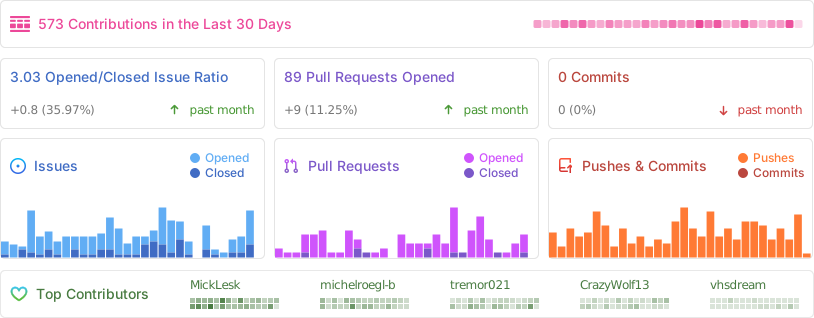
📈 Project Statistics
📜 License
This project is licensed under the MIT License - feel free to use, modify, and distribute.
Proxmox® is a registered trademark of Proxmox Server Solutions GmbH