mirror of
https://github.com/seriousm4x/UpSnap.git
synced 2026-03-31 06:24:09 -04:00
 1d361e3f8b
* update ping privileged/unprivileged logic, add entrypoint

Signed-off-by: invario <67800603+invario@users.noreply.github.com>

* Removed entrypoint script, code in GO instead to raise NET_RAW cap

Signed-off-by: invario <67800603+invario@users.noreply.github.com>

* Rewritten to only split pingdevice func into separate GO files

Signed-off-by: invario <67800603+invario@users.noreply.github.com>

* remove runtime check

* readme: cap_net_raw=+p

* clear up

* readme: clearify linux only

* set `privileged = false` on darwin

---------

Signed-off-by: invario <67800603+invario@users.noreply.github.com>
Co-authored-by: Maxi Quoß <maxi@quoss.org>
221 lines
7.9 KiB
Markdown
221 lines
7.9 KiB
Markdown
<div align="center" width="100%">
|
|
<img src="frontend/static/gopher.svg" width="150" />
|
|
</div>
|
|
|
|
<div align="center" width="100%">
|
|
<h2>UpSnap</h2>
|
|
<p>A simple wake on lan web app written with SvelteKit, Go and PocketBase.</p>
|
|
<div>
|
|
<a target="_blank" href="https://github.com/seriousm4x/upsnap"><img src="https://img.shields.io/github/stars/seriousm4x/UpSnap?style=flat&label=Stars" /></a>
|
|
<a target="_blank" href="https://github.com/seriousm4x/UpSnap/pkgs/container/upsnap"><img src="https://img.shields.io/badge/dynamic/json?url=https%3A%2F%2Fraw.githubusercontent.com%2Fipitio%2Fbackage%2Findex%2Fseriousm4x%2FUpSnap%2Fupsnap.json&query=downloads&label=ghcr.io%20pulls" /></a>
|
|
<a target="_blank" href="https://hub.docker.com/r/seriousm4x/upsnap"><img src="https://img.shields.io/docker/pulls/seriousm4x/upsnap?label=docker%20hub%20pulls" /></a>
|
|
<a target="_blank" href="https://github.com/seriousm4x/UpSnap/releases"><img src="https://img.shields.io/github/downloads/seriousm4x/upsnap/total?label=binary%20downloads" /></a>
|
|
</div>
|
|
<div>
|
|
<a target="_blank" href="https://github.com/seriousm4x/UpSnap/releases"><img src="https://img.shields.io/github/go-mod/go-version/seriousm4x/UpSnap?filename=backend/go.mod" /></a>
|
|
<a target="_blank" href="https://github.com/seriousm4x/UpSnap/releases"><img src="https://img.shields.io/github/v/release/seriousm4x/upsnap?display_name=tag&label=Latest%20release" /></a>
|
|
<a target="_blank" href="https://github.com/seriousm4x/UpSnap/actions"><img src="https://github.com/seriousm4x/upsnap/actions/workflows/release.yml/badge.svg?event=push" /></a>
|
|
<a target="_blank" href="https://github.com/seriousm4x/UpSnap/commits/master"><img src="https://img.shields.io/github/last-commit/seriousm4x/upsnap" /></a>
|
|
</div>
|
|
</div>
|
|
|
|
> [!NOTE]
|
|
>
|
|
> #### UpSnap is, and always will be, free and open source software.
|
|
>
|
|
> If someone is asking you to pay money for access to UpSnap binaries, source code, or licenses, you are being scammed.
|
|
>
|
|
> The official and only trusted source for UpSnap is this repository (and its linked releases).
|
|
> Do not pay third parties for something that is provided here for free.
|
|
|
|
## ✨ Features
|
|
|
|
- 🚀 One-Click Device Wake-Up Dashboard
|
|
- ⏰ Timed Events via Cron for Automation
|
|
- 🔌 Ping Any Port You Choose
|
|
- 🔍 Discover Devices with Network Scanning (nmap required)
|
|
- 👤 Secured User Management
|
|
- 🌐 i18n support for [these](/frontend/translations) languages
|
|
- 🎨 35 Themes
|
|
- 🐳 [Docker images](https://github.com/seriousm4x/UpSnap/pkgs/container/upsnap) for amd64, arm64, arm/v7, arm/v6
|
|
- 🏠 Self-Hostable
|
|
|
|
## 📸 Screenshots
|
|
|
|
| Silk | Dim |
|
|
| ---------------------------------- | --------------------------------- |
|
|
|  |  |
|
|
|  |  |
|
|
|  |  |
|
|
|  |  |
|
|
|  |  |
|
|
|  |  |
|
|
|
|
## 🚀 Run the binary
|
|
|
|
Just download the latest binary from the [release page](https://github.com/seriousm4x/UpSnap/releases) and run it.
|
|
|
|
### Root:
|
|
|
|
```bash
|
|
sudo ./upsnap serve --http=0.0.0.0:8090
|
|
```
|
|
|
|
### Non-root on linux only:
|
|
|
|
```bash
|
|
sudo setcap cap_net_raw=+p ./upsnap # only once after downloading to allow for pinging devices
|
|
./upsnap serve --http=0.0.0.0:8090
|
|
```
|
|
|
|
For more options check `./upsnap --help` or visit [PocketBase documentation](https://pocketbase.io/docs).
|
|
|
|
If you want to use network discovery, make sure to have `nmap` installed and run UpSnap as root/admin.
|
|
|
|
## 🐳 Run in docker
|
|
|
|
You can use the [docker-compose](docker-compose.yml) example. See the comments in the file for customization.
|
|
|
|
### Non-root docker user:
|
|
|
|
You will lose the ability to add network devices via the scan page.
|
|
|
|
Create the mount point first:
|
|
|
|
```bash
|
|
mkdir data
|
|
```
|
|
|
|
Then add `user: 1000:1000` to the docker-compose file (or whatever your $UID:$GID is).
|
|
|
|
### Change port
|
|
|
|
If you want to change the port from 8090 to something else, change the following (5000 in this case):
|
|
|
|
```yml
|
|
environment:
|
|
- UPSNAP_HTTP_LISTEN=0.0.0.0:5000
|
|
```
|
|
|
|
### Install additional packages for shutdown cmd
|
|
|
|
```yml
|
|
entrypoint: /bin/sh -c "apk update && apk add --no-cache <YOUR_PACKAGE> && rm -rf /var/cache/apk/* && ./upsnap serve"
|
|
```
|
|
|
|
You can search for your needed package [here](https://pkgs.alpinelinux.org/packages).
|
|
|
|
### Reverse Proxy
|
|
|
|
**Caddy example**
|
|
|
|
```
|
|
upsnap.example.com {
|
|
reverse_proxy localhost:8090
|
|
}
|
|
```
|
|
|
|
### Run in sub path
|
|
|
|
You can run UpSnap on a different path than `/`, e.g. `/upsnap-sub-path/`. To do this in caddy, set the following:
|
|
|
|
```
|
|
http://localhost:8091 {
|
|
handle /upsnap-sub-path/* {
|
|
uri strip_prefix /upsnap-sub-path
|
|
reverse_proxy localhost:8090
|
|
}
|
|
}
|
|
```
|
|
|
|
Or nginx:
|
|
|
|
```
|
|
http {
|
|
server {
|
|
listen 8091;
|
|
server_name localhost;
|
|
location /upsnap-sub-path/ {
|
|
proxy_pass http://localhost:8090/;
|
|
proxy_redirect off;
|
|
proxy_set_header Host $host;
|
|
proxy_set_header X-Real-IP $remote_addr;
|
|
proxy_set_header X-Forwarded-For $proxy_add_x_forwarded_for;
|
|
proxy_set_header X-Forwarded-Proto $scheme;
|
|
}
|
|
}
|
|
}
|
|
```
|
|
|
|
Paths must end with a trailing `/`.
|
|
|
|
## 🐧 Install from the [AUR](https://aur.archlinux.org/packages/upsnap-bin)
|
|
|
|
```bash
|
|
yay -Sy upsnap-bin
|
|
```
|
|
|
|
## 🔒 User permissions
|
|
|
|
UpSnap offers unique access for each user, per device. While admins have all permissions, they can assign specific rights to users such as displaying/hiding a device, accessing device editing, deleting and powering devices on/off. See the last screenshot in the [📸 Screenshots section](#-screenshots).
|
|
|
|
## 🌍 Exposing to the open web
|
|
|
|
Although UpSnap has user authorisation, it is **not recommended to expose it to the open web** and make it accessible by everyone!
|
|
|
|
**Reason**: The shutdown device command is basically a command piped to #sh (root if you run docker). If anyone gains unauthorized access and can abuse this api route in any way, the attacker has access to a (root) shell on your local network.
|
|
|
|
**Recommended**: If you need access from outside your network, please use a vpn. Wireguard or OpenVPN is your way to go.
|
|
|
|
## 🌐 Help translating
|
|
|
|
UpSnap is available in the following languages so far:
|
|
|
|
- 🇧🇬 **Bulgarian (Bulgaria)** (bg-BG)
|
|
- 🇨🇿 **Czech (Czech republic)** (cs-CZ)
|
|
- 🇩🇪 **German (Germany)** (de-DE)
|
|
- 🇺🇸 **English (United States)** (en-US)
|
|
- 🇪🇸 **Spanish (Spain)** (es-ES)
|
|
- 🇫🇷 **French (France)** (fr-FR)
|
|
- 🇮🇳 **Hindi (India)** (hi-IN)
|
|
- 🇮🇩 **Bahasa (Indonesia)** (id-ID)
|
|
- 🇮🇹 **Italian (Italy)** (it-IT)
|
|
- 🇯🇵 **Japanese (Japan)** (ja-JP)
|
|
- 🇳🇱 **Dutch (Netherlands)** (nl-NL)
|
|
- 🇳🇴 **Norwegian (Norway)** (nb-NO)
|
|
- 🇵🇱 **Polish (Poland)** (pl-PL)
|
|
- 🇵🇹 **Portuguese (Portugal)** (pt-PT)
|
|
- 🇷🇺 **Russian (Russia)** (ru-RU)
|
|
- 🇺🇦 **Ukrainian (Ukrain)** (uk-UA)
|
|
- 🇻🇳 **Vietnamese (Vietnam)** (vi-VN)
|
|
- 🇹🇼 **Chinese (Taiwan)** (zh-TW)
|
|
- 🇨🇳 **Chinese (China)** (zh-CN)
|
|
|
|
**If you want to contribute and help translating, check the wiki: [How to add languages](https://github.com/seriousm4x/UpSnap/wiki/How-to-add-languages)**
|
|
|
|
## 🔧 Help developing
|
|
|
|
Fork this branch and clone it.
|
|
|
|
1. Start backend
|
|
|
|
```sh
|
|
cd backend
|
|
go mod tidy
|
|
go run main.go serve
|
|
```
|
|
|
|
2. Start frontend
|
|
|
|
```sh
|
|
cd frontend
|
|
pnpm i
|
|
pnpm run dev
|
|
```
|
|
|
|
Open up [http://localhost:5173/](http://localhost:5173/), create an admin user and add some devices.
|
|
|
|
## 🌟 Star History
|
|
|
|
[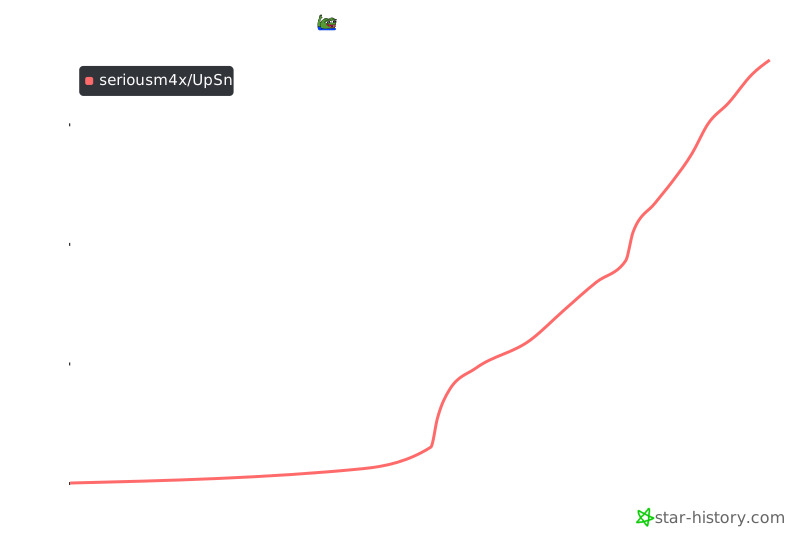](https://star-history.com/#seriousm4x/UpSnap&Date)
|