
Lightweight DDNS Updater with Docker and web UI
Lightweight scratch based container updating DNS A records periodically for GoDaddy, Namecheap and DuckDNS.











| Download size | Image size | RAM usage | CPU usage |
|---|---|---|---|
| ???MB | ???MB | ???MB | Very low |
Features
- Updates periodically A records for different DNS providers: Namecheap, GoDaddy, DuckDNS (ask for more)
- Integrated Docker healthcheck program
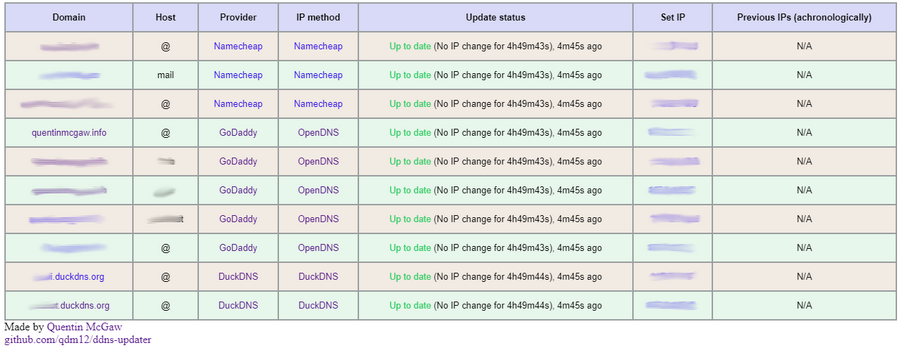
- Web User interface
- Very lightweight
- Scratch with two Golang binaries
- Healthcheck (UPX-compressed)
- Main program
- Ca-Certificates
- Scratch with two Golang binaries
- Emojis 👍
Setup
To setup your domains initially, see the Domain set up section.
You can then run this container with either Docker:
docker run -d -p 80:80 -e RECORD1=example.com,@,namecheap,0e4512a9c45a4fe88313bcc2234bf547 qmcgaw/ddns-updater
or with Docker Compose:
version: '3'
services:
  ddns-updater:
    image: qmcgaw/ddns-updater
    container_name: ddns-updater
    environment:
      - DELAY=300
      - ROOTURL=
      - LISTENINGPORT=80
      - RECORD1=example.com,@,namecheap,provider,0e4512a9c45a4fe88313bcc2234bf547
      - RECORD2=example.info,@,namecheap,duckduckgo,157fd2a9c45a4fe88313bcc2234bfd58
      - RECORD3=example,www,namecheap,opendns,0e4512a9c45a4fe88313bcc2234bf547
      - RECORD4=example.info,subdomain,namecheap,222.145.121.59,4a67d2a9c45a4fe88313bcc2234bfd62
      - RECORD5=example.org,*,godaddy,opendns,dLP4WKz5PdkS_GuUDNigHcLQFpw4CWNwAQ5:GuUFdVFj8nJ1M79RtdwmkZ
      - RECORD6=example.app,@,godaddy,duckduckgo,dLP4WKz5PdkS_GuUDNigHcLQFpw4CWNwAQ5:GuUFdVFj8nJ1M79RtdwmkZ
      - RECORD7=example.duckdns.org,@,duckdns,provider,064a0540-864c-4f0f-8bf5-23857452b0c1
      - RECORD8=example2.duckdns.org,@,duckdns,opendns,064a0540-864c-4f0f-8bf5-23857452b0c1
    ports:
      - 8000:80/tcp
    network_mode: bridge
    restart: always
docker-compose up -d
The following environement variables are available:
| Environment variable | Default | Description |
|---|---|---|
DELAY |
300 |
Delay between updates in seconds |
ROOTURL |
/ |
URL path to append to all paths (i.e. /ddns for accessing https://example.com/ddns) |
| LISTENINGPORT | 80 |
Internal TCP listening port for the web UI |
RECORDi |
A record to update in the form domain_name,host,provider,ip_method,password |
- The environement variables
RECORD1,RECORD2, etc. are domains to update the IP address for- The program reads them, starting at
RECORD1and will stop as soon asRECORDnis not set - Each must respect the format
domain_name,host,provider,ip_method,password - The
ip_methodparameter can be:providerfinds your public IP using your DNS provider (Namecheap or DuckDNS only)duckduckgofinds your public IP using https://duckduckgo.com/?q=ipopendnsfinds your public IP using https://diagnostic.opendns.com/myip154.251.67.58sets your public IP as fixed
- The program reads them, starting at
- The port mapping
8000:80is for the web interface- http://localhost:8000 is the main UI list
- http://localhost:8000/update is to force the update of your domains
For additional firewall purposes, this container needs the following ports:
- TCP 443 outbound
- UDP 53 outbound
- TCP 8000 inbound (or other) for the WebUI
Domain set up
Namecheap

- Create a Namecheap account and buy a domain name - example.com as an example
- Login to Namecheap at https://www.namecheap.com/myaccount/login.aspx
For each domain name you want to add, replace example.com in the following link with your domain name and go to https://ap.www.namecheap.com/Domains/DomainControlPanel/example.com/advancedns
-
For each host you want to add (if you don't know, create one record with the host set to
*):-
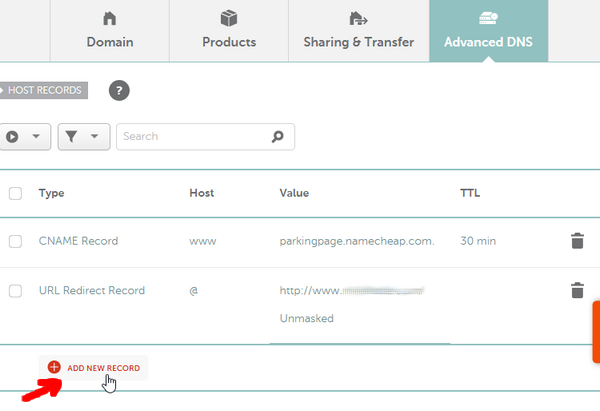
In the HOST RECORDS section, click on ADD NEW RECORD
-
Select the following settings and create the A + Dynamic DNS Record:

-
-
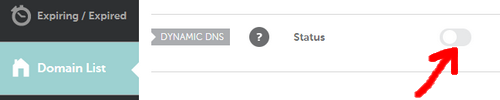
Scroll down and turn on the switch for DYNAMIC DNS
-
The Dynamic DNS Password will appear, which is
0e4512a9c45a4fe88313bcc2234bf547in this example.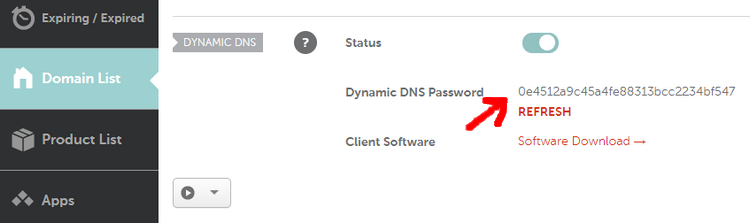
GoDaddy

- Login to https://developer.godaddy.com/keys with your account credentials.

- Generate a Test key and secret.

- Generate a Production key and secret.

Obtain the key and secret of that production key.
In this example, the key is dLP4WKz5PdkS_GuUDNigHcLQFpw4CWNwAQ5 and the secret is GuUFdVFj8nJ1M79RtdwmkZ.
DuckDNS

Testing
- The automated healthcheck verifies all your records are up to date using DNS lookups
- You can check manually at:
-
GoDaddy: https://dcc.godaddy.com/manage/yourdomain.com/dns (replace yourdomain.com)

You might want to try to change the IP address to another one to see if the update actually occurs.
-
Namecheap:
-
DuckDNS:
-
TODOs
- Add favicon.ico
- Finish readme
- Delete old repos
- Live update of website
- Unit tests
- Other types or records
- Better HTML webpage with possibility to change settings