
Lightweight universal DDNS Updater with Docker and web UI
Light container updating DNS A records periodically for Cloudflare, DDNSS.de, DonDominio, DNSOMatic, DNSPod, Dreamhost, DuckDNS, DynDNS, GoDaddy, Google, He.net, Infomaniak, Namecheap and NoIP










Features
- Updates periodically A records for different DNS providers: Cloudflare, DDNSS.de, DonDominio, DNSOMatic, DNSPod, Dreamhost, DuckDNS, DynDNS, GoDaddy, Google, He.net, Infomaniak, Namecheap and NoIP (create an issue for more)
- Web User interface
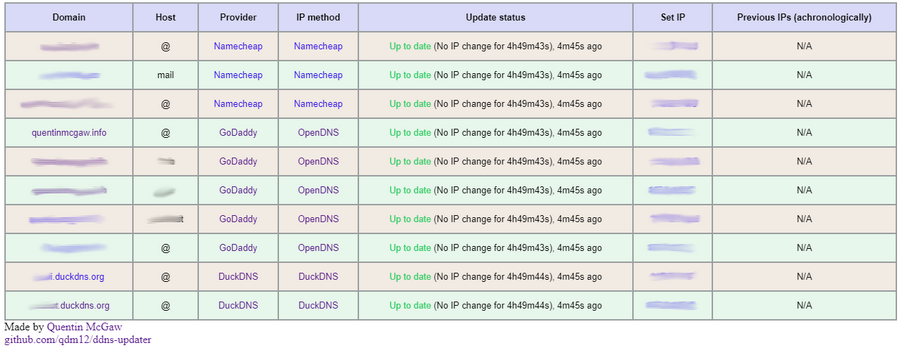
- 14MB Docker image based on a Go static binary in a Scratch Docker image with ca-certificates and timezone data
- Persistence with a JSON file updates.json to store old IP addresses with change times for each record
- Docker healthcheck verifying the DNS resolution of your domains
- Highly configurable
- Sends notifications to your Android phone, see the Gotify section (it's free, open source and self hosted 🆒)
- Compatible with
amd64,386,arm64,arm32v7(Raspberry Pis) CPU architectures.
Setup
The program reads the configuration from a JSON object, either from a file or from an environment variable.
-
Create a directory of your choice, say data with a file named config.json inside:
mkdir data
touch data/config.json
# Owned by user ID of Docker container (1000)
chown -R 1000 data
# all access (for creating json database file data/updates.json)
chmod 700 data
# read access only
chmod 400 data/config.json
(You could change the user ID, for example with
1001, by running the container with--user=1001) -
Write a JSON configuration in data/config.json, for example:
{
    "settings": [
        {
            "provider": "namecheap",
            "domain": "example.com",
            "host": "@",
            "password": "e5322165c1d74692bfa6d807100c0310"
        },
        {
            "provider": "duckdns",
            "domain": "example.duckdns.org",
            "token": "00000000-0000-0000-0000-000000000000"
        },
        {
            "provider": "godaddy",
            "domain": "example.org",
            "host": "subdomain",
            "key": "aaaaaaaaaaaaaaaa",
            "secret": "aaaaaaaaaaaaaaaa"
        }
    ]
}
You can find more information in the configuration section to customize it.
-
Run the container with
docker run -d -p 8000:8000/tcp -v "$(pwd)"/data:/updater/data qmcgaw/ddns-updater -
(Optional) You can also set your JSON configuration as a single environment variable line (i.e.
{"settings": [{"provider": "namecheap", ...}]}), which takes precedence over config.json. Note however that if you don't bind mount the/updater/datadirectory, there won't be a persistent database file/updater/updates.jsonbut it will still work.
Next steps
You can also use docker-compose.yml with:
docker-compose up -d
You can update the image with docker pull qmcgaw/ddns-updater. Other Docker image tags are available.
Configuration
Start by having the following content in config.json, or in your CONFIG environment variable:
{
    "settings": [
        {
            "provider": "",
        },
        {
            "provider": "",
        }
    ]
}
The following parameters are to be added:
For all record update configuration, you have to specify the DNS provider with "provider" which can be "cloudflare", "ddnss", "dondominio", "dnsomatic", "dnspod", "dreamhost", "duckdns", "dyn", "godaddy", "google", "he", "infomaniak", "namecheap" or "noip".
You can optionnally add the parameters:
"no_dns_lookup"can betrueorfalseand allows, iftrue, to prevent the program from doing assumptions from DNS lookups returning an IP address not matching your public IP address (in example for proxied records on Cloudflare)."provider_ip"can betrueorfalse. It is only available for the providersddnss,duckdns,he,infomaniak,namecheap,noipanddyndns. It allows to let your DNS provider to determine your IPv4 address (and/or IPv6 address) automatically when you send an update request, without sending the new IP address detected by the program in the request.
For each DNS provider exist some specific parameters you need to add, as described below:
Namecheap:
"domain""host"is your host and can be a subdomain,"@"or"*"generally"password"
Cloudflare:
"zone_identifier"is the Zone ID of your site"domain""host"is your host and can be a subdomain,"@"or"*"generally"ttl"integer value for record TTL in seconds (specify 1 for automatic)- One of the following:
- Email
"email"and Global API Key"key" - User service key
"user_service_key" - API Token
"token", configured with DNS edit permissions for your DNS name's zone.
- Email
- Optionally,
"proxied"can betrueorfalseto use the proxy services of Cloudflare "ip_version"can beipv4(A records) oripv6(AAAA records), defaults toipv4 or ipv6
GoDaddy:
"domain""host"is your host and can be a subdomain,"@"or"*"generally"key""secret""ip_version"can beipv4(A records) oripv6(AAAA records), defaults toipv4 or ipv6
DuckDNS:
"domain"is your fqdn, for examplesubdomain.duckdns.org"token""ip_version"can beipv4(A records) oripv6(AAAA records), defaults toipv4 or ipv6
Dreamhost:
"domain""key""ip_version"can beipv4(A records) oripv6(AAAA records), defaults toipv4 or ipv6
NoIP:
"domain""host"is your host and can be a subdomain or"@""username""password""ip_version"can beipv4(A records) oripv6(AAAA records), defaults toipv4 or ipv6
DNSOMatic:
"domain""host"is your host and can be a subdomain or"@"or"*""username""password""ip_version"can beipv4(A records) oripv6(AAAA records), defaults toipv4 or ipv6
DNSPOD:
"domain""host"is your host and can be a subdomain or"@""token""ip_version"can beipv4(A records) oripv6(AAAA records), defaults toipv4 or ipv6
HE.net:
"domain""host"is your host and can be a subdomain or"@"or"*"(untested)"password""ip_version"can beipv4(A records) oripv6(AAAA records), defaults toipv4 or ipv6
Infomaniak:
"domain""host"is your host and can be a subdomain or"@""user""password""ip_version"can beipv4(A records) oripv6(AAAA records), defaults toipv4 or ipv6
DDNSS.de:
"domain""host"is your host and can be a subdomain or"@""user""password""ip_version"can beipv4(A records) oripv6(AAAA records), defaults toipv4 or ipv6
DYNDNS:
"domain""host"is your host and can be a subdomain or"@""username""password""ip_version"can beipv4(A records) oripv6(AAAA records), defaults toipv4 or ipv6
Google:
"domain""host"is your host and can be a subdomain or"@"or"*""username""password""ip_version"can beipv4(A records) oripv6(AAAA records), defaults toipv4 or ipv6
DonDominio:
"domain""username""password""ip_version"can beipv4(A records) oripv6(AAAA records), defaults toipv4 or ipv6"name"is the name server associated with the domain
Additional notes
- You can specify multiple hosts for the same domain using a comma separated list. For example with
"host": "@,subdomain1,subdomain2",.
Environment variables
| Environment variable | Default | Description |
|---|---|---|
CONFIG |
One line JSON object containing the entire config (takes precendence over config.json file) if specified | |
PERIOD |
5m |
Default period of IP address check, following this format |
IP_METHOD |
cycle |
Method to obtain the public IP address (ipv4 or ipv6). See the IP Methods section |
IPV4_METHOD |
cycle |
Method to obtain the public IPv4 address only. See the IP Methods section |
IPV6_METHOD |
cycle |
Method to obtain the public IPv6 address only. See the IP Methods section |
HTTP_TIMEOUT |
10s |
Timeout for all HTTP requests |
LISTENING_PORT |
8000 |
Internal TCP listening port for the web UI |
ROOT_URL |
/ |
URL path to append to all paths to the webUI (i.e. /ddns for accessing https://example.com/ddns through a proxy) |
BACKUP_PERIOD |
0 |
Set to a period (i.e. 72h15m) to enable zip backups of data/config.json and data/updates.json in a zip file |
BACKUP_DIRECTORY |
/updater/data |
Directory to write backup zip files to if BACKUP_PERIOD is not 0. |
LOG_ENCODING |
console |
Format of logging, json or console |
LOG_LEVEL |
info |
Level of logging, info, warning or error |
GOTIFY_URL |
(optional) HTTP(s) URL to your Gotify server | |
GOTIFY_TOKEN |
(optional) Token to access your Gotify server | |
TZ |
Timezone to have accurate times, i.e. America/Montreal |
IP methods
By default, all ip methods are cycled through between all ip methods available for the specified ip version, if any. This allows you not to be blocked for making too many requests. You can otherwise pick one of the following.
- IPv4 or IPv6 (for most cases)
opendnsusing https://diagnostic.opendns.com/myipifconfigusing https://ifconfig.io/ipipinfousing https://ipinfo.io/ipipifyusing https://api.ipify.org"ddnss"using https://ddnss.de/meineip.php"google"using https://domains.google.com/checkip
- IPv4 only (useful for updating both ipv4 and ipv6)
ipifyusing https://api.ipify.org"ddnss4"using https://ip4.ddnss.de/meineip.php"noip4"using http://ip1.dynupdate.no-ip.com"noip8245_4"using http://ip1.dynupdate.no-ip.com:8245
- IPv6 only
ipify6using https://api6.ipify.org"ddnss6"using https://ip6.ddnss.de/meineip.php"noip6"using http://ip1.dynupdate.no-ip.com"noip8245_6"using http://ip1.dynupdate.no-ip.com:8245
You can also specify an HTTPS URL to obtain your public IP address (i.e. -e IPV6_METHOD=https://ipinfo.io/ip)
Host firewall
If you have a host firewall in place, this container needs the following ports:
- TCP 443 outbound for outbound HTTPS
- TCP 80 outbound if you use a local unsecured HTTP connection to your Gotify server
- UDP 53 outbound for outbound DNS resolution
- TCP 8000 inbound (or other) for the WebUI
Domain set up
Instructions to setup your domain for this program are available for DuckDNS, Cloudflare, GoDaddy and Namecheap on the Github Wiki.
Gotify

Gotify is a simple server for sending and receiving messages, and it is free, private and open source
- It has an Android app to receive notifications
- The app does not drain your battery 👍
- The notification server is self hosted, see how to set it up with Docker
- The notifications only go through your own server (ideally through HTTPS though)
To set it up with DDNS updater:
- Go to the Web GUI of Gotify
- Login with the admin credentials
- Create an app and copy the generated token to the environment variable
GOTIFYTOKEN(for this container) - Set the
GOTIFYURLvariable to the URL of your Gotify server address (i.e.http://127.0.0.1:8080orhttps://bla.com/gotify)
Testing
-
The automated healthcheck verifies all your records are up to date using DNS lookups
-
You can also manually check, by:
- Going to your DNS management webpage
- Setting your record to
127.0.0.1 - Run the container
- Refresh the DNS management webpage and verify the update happened
Better testing instructions are written in the Wiki for GoDaddy
Development and contributing
- Contribute with code: see the Wiki
- Github workflows to know what's building
- List of issues and feature requests
- Kanban board
License
This repository is under an MIT license
Used in external projects
Support
Sponsor me on Github or donate to paypal.me/qmcgaw


Many thanks to J. Famiglietti for supporting me financially 🥇👍